 Checklist for Jira
 Backlog Prioritization for Jira
 Risk Register for Jira
 Response Templates for Jira
 AI Agents for Jira
 GPT for Jira
 Advanced Queues for Jira
 Nexus CRM for Jira
Test plan template for Jira: a one-page plan for every release
A one-page test plan template with a filled example: scope, environments, entry and exit criteria, risks and sign-off, and two ways to run it in Jira.
A test plan answers three questions before testing starts: what are we testing, how will we know we’re done, and who decides we can ship. Most teams don’t need a 20-page document for that. They need one page that everyone reads, kept next to the work it covers.
This template fits on a page. Below are its ten sections, a filled example for a checkout release, a text file to copy, and two ways to run the plan in Jira.
What a test plan is, and what it isn’t
A test plan covers one release or project: its scope, approach, environments, criteria, risks, schedule and people. A test strategy sits above it and describes how your organization tests in general, so one strategy guides many plans.
The international standard for test documentation, ISO/IEC/IEEE 29119-3, which replaced IEEE 829, describes a much fuller plan. That suits regulated work and long projects. For a team that ships every week or two, a plan earns its keep when it’s short enough to read in five minutes and specific enough to settle the arguments that come up during testing: is gift card checkout in this release, and are we done?
The template, with a filled example
Each section takes a line or two. The right-hand column fills it in for SHOP 2.4, a checkout release that adds saved cards and PayPal and fixes a Safari payment bug.
| Section | What to write | Example: SHOP 2.4 |
|---|---|---|
| Scope | The features or stories this plan tests. In Jira, the release’s fix version | Saved cards (SHOP-142), PayPal checkout (SHOP-150) and the Safari payment fix (SHOP-158) |
| Out of scope | What it doesn’t test, and why | Gift cards and the admin reports, which don’t change in 2.4 |
| Approach | The test types, and which run by hand or in CI | Smoke tests on every build in CI, the checkout regression suite by hand, and one exploratory hour on payments |
| Environments and data | Where testing happens, on what, and with which data | Staging, build 2.4.0-rc1, in Chrome, Firefox, Safari and iOS Safari, with PayPal sandbox accounts |
| Entry criteria | What must be true before testing starts | The release candidate is on staging, and every story in scope is in Ready for QA |
| Exit criteria | What must be true before you ship | Every smoke and checkout test has run, no blocker or critical bugs are open, and each story has a passing test |
| Risks | What could go wrong, and what you’ll do about it | The PayPal sandbox goes down: test against the payments mock, then recheck PayPal before release |
| Schedule | When testing starts and ends, and the go/no-go | Testing Monday to Thursday, go/no-go on Friday morning |
| Roles | Who tests, who triages bugs, who signs off | Priya Sharma tests and signs off, and Tom Becker triages bugs |
| Deliverables | What the plan leaves behind | The run results, the open bugs and a sign-off comment on the plan |
Download the template as a text file, paste it into the plan’s description, and replace the prompts.
Exit criteria matter most. Without them, testing ends when time runs out, and the go/no-go meeting turns into a debate. Write them so anyone can check them: “no blocker or critical bugs are open” can be checked, and “quality is acceptable” can’t.
Run the plan in plain Jira
Jira has no test plan of its own, but it has the pieces. If you keep tests as work items, as in our guide to test case management in Jira, add the plan the same way:
- Make the plan a work item: a Test Plan work type, or an epic for each release, with the template in its description. The same guide shows an automation flow that fills in a description when a work item is created.
- Point it at its tests. Save the plan’s suites as a filter and link it from the description.
- Record each run. Clone a template run with a sub-task for each test, as in Jira test execution reports, and set each result as you go.
- Watch the exit criteria. Put the run’s results and the release’s open bugs on a dashboard.
The first filter below lists the plan’s tests. The second lists the release’s open bugs at Jira’s two highest priorities, the ones that would block it:
project = QA AND type = Test AND (labels = smoke OR (labels = regression AND component = Checkout))
project = SHOP AND fixVersion = "2.4" AND type = Bug AND priority in (Highest, High) AND statusCategory != Done
This works for a small team, but the plan only describes its scope. Nothing ties it to the tests that actually ran:
- The scope drifts. A filter is live, so tests added or relabeled after the run change what the plan seems to cover.
- Results live on copies. Each run is a set of cloned sub-tasks, so a test’s latest result, or a comparison between two runs, takes more filters.
- Coverage is manual. Checking that every story has a passing test means following links one story at a time, as our guide to requirements traceability shows.
- The criteria are only text. Nothing checks the entry and exit criteria for you.
Run the plan in Advanced Test Management
Advanced Test Management gives test cases, sets, plans and runs their own work types and screens inside Jira.
Build the plan from test sets
Group cases into test sets, such as a smoke suite and a regression suite. A case can sit in any number of sets. A test plan then pulls in whole sets, or single cases, and has its own environment scope and start and target end dates. Its effective scope is every case it will run, with each case counted once:
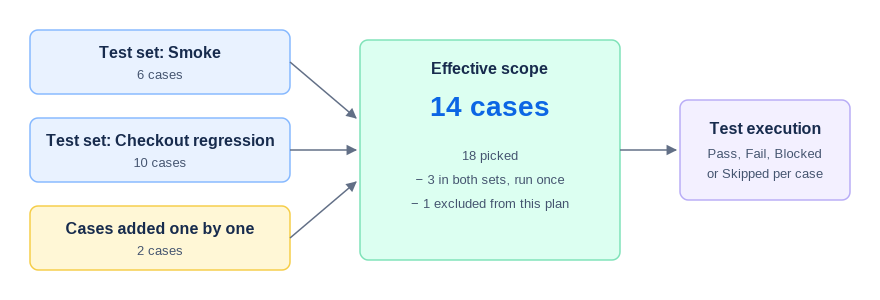 18 picks, 14 cases run: a case in two sets runs once, and an excluded case drops out of this plan only.
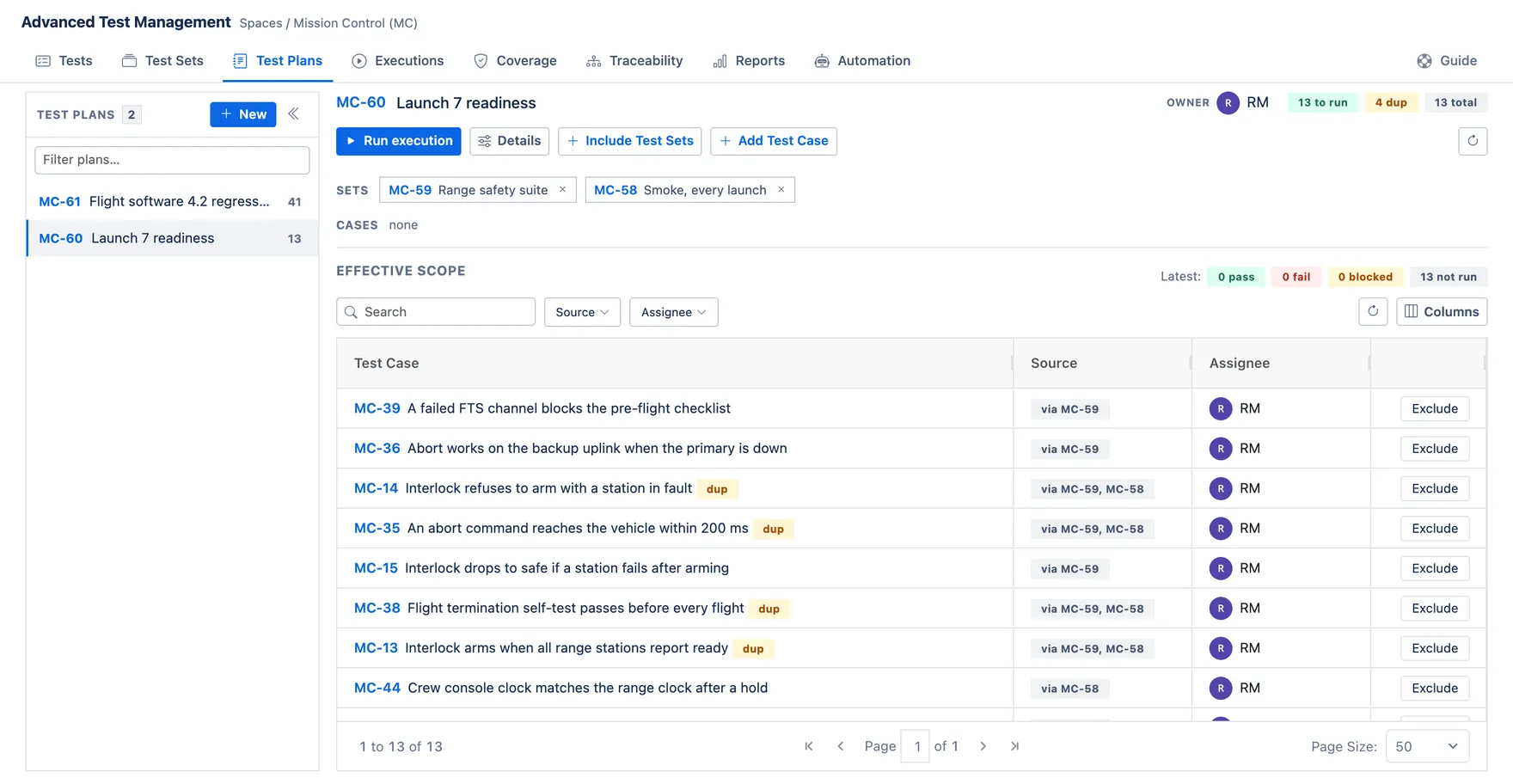 A plan built from two sets. The Source column shows where each case came from, and cases in both sets are marked dup.
Run it, case by case
Run execution starts a run of the whole plan. The runner shows each case’s preconditions and steps, a box for what actually happened, and Pass, Fail, Blocked and Skip. Set the environment or build once, and it’s recorded against the whole run. Keys 1 to 4 mark a case, and N jumps to the next one not yet run.
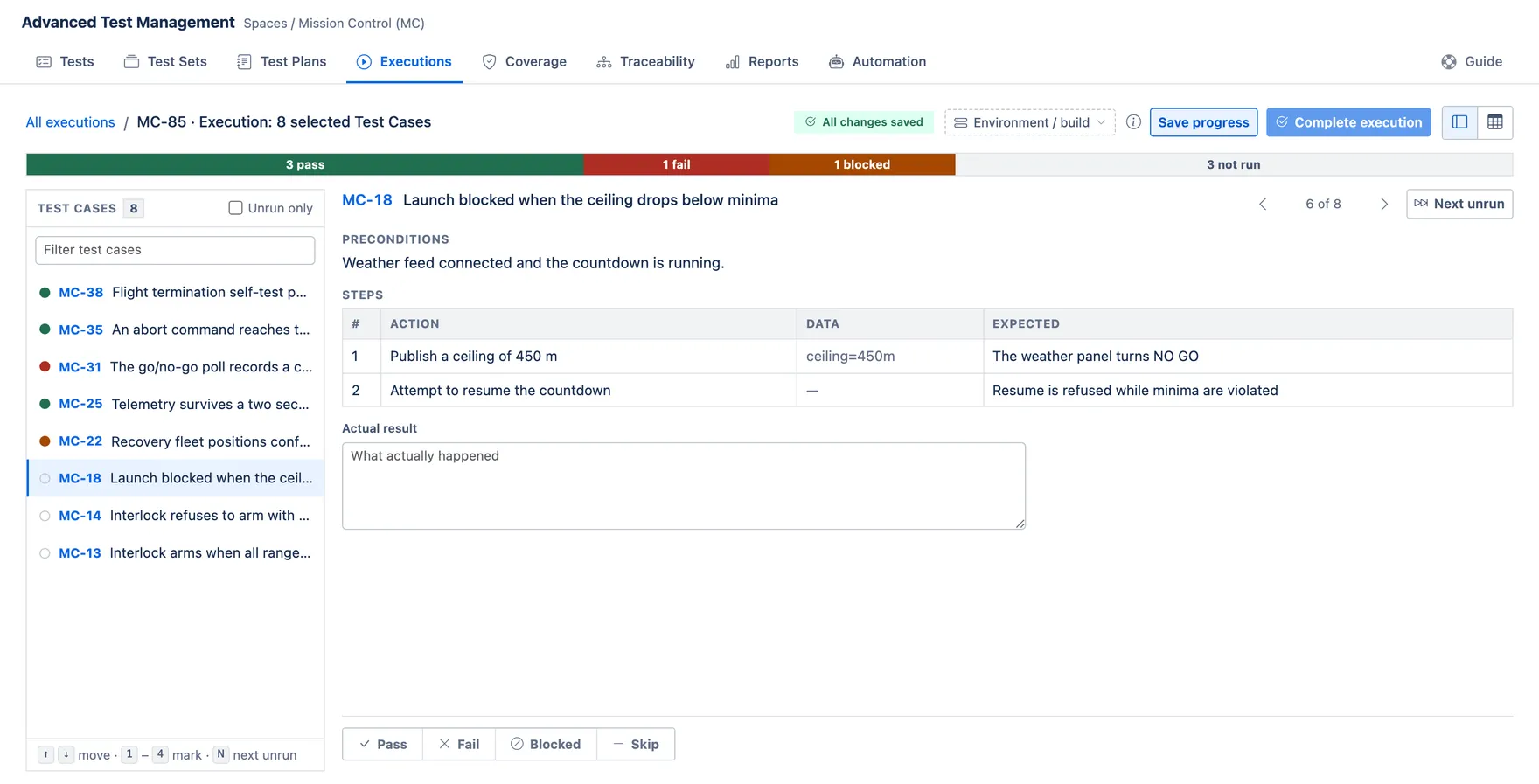 A run in progress. Complete execution stays disabled until every case has a result.
A run with any failure is a Fail, one with a blocked case is Blocked, and it’s a Pass only when every case passed or was skipped. Results from your pipeline arrive as runs too, tagged as automation, as described in importing test results from CI.
Check the exit criteria
The Coverage tab lists each requirement with the number of tests linked to it. A requirement is uncovered when no test is linked, failing when a linked test last ran as a fail, and covered otherwise. “Every story has a passing test” becomes something you can read off one screen.
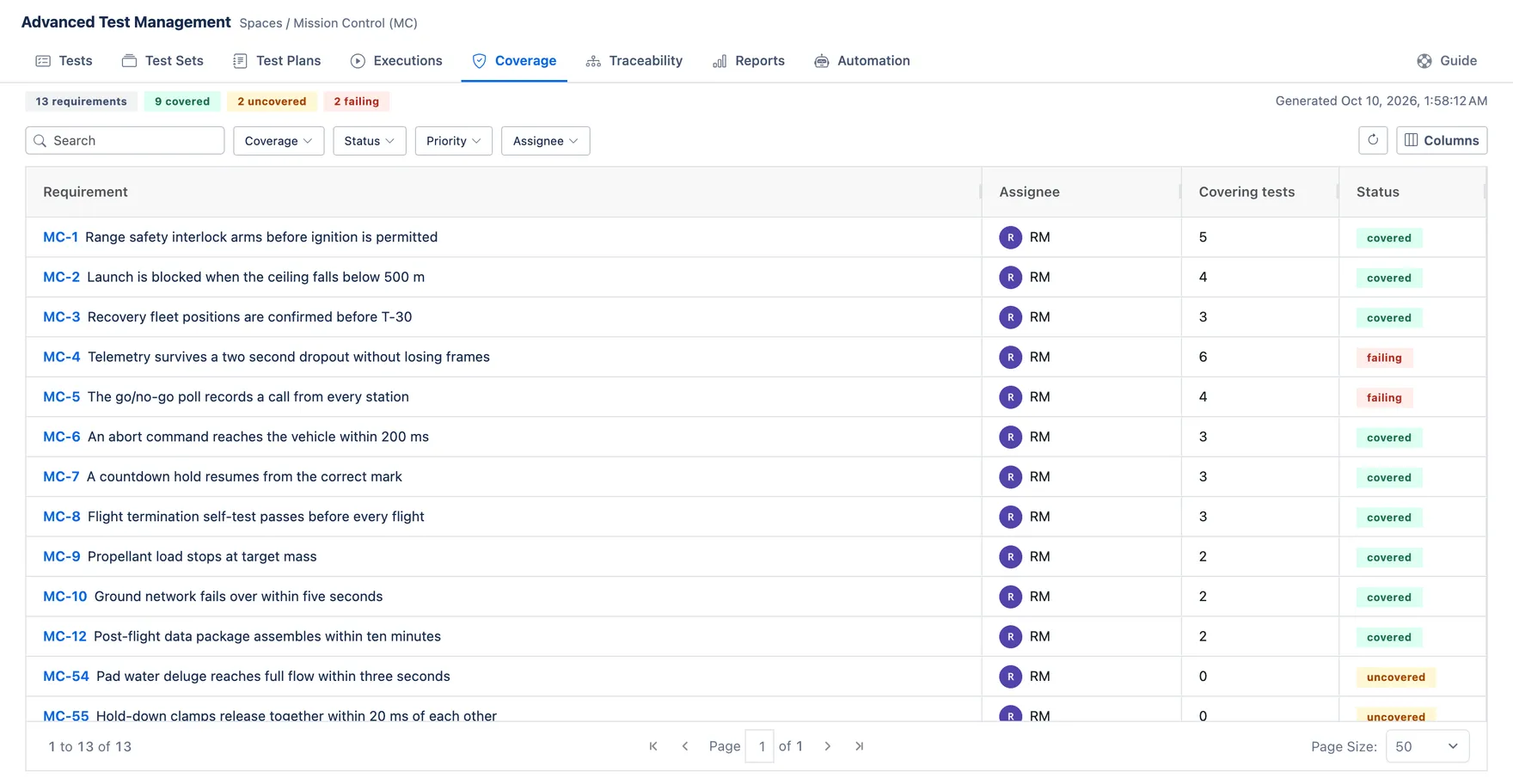 Coverage for a release: the two uncovered requirements still need a test before go/no-go.
The Traceability tab follows each requirement to its tests, their latest results and any bugs raised against them. For the go/no-go meeting, the app’s reports and its dashboard gadget put the numbers where the team already looks. The app carries the Marketplace’s Runs on Atlassian badge.
Mistakes to avoid
- Writing a document nobody reads. If the plan runs past a page, people read the scope and guess the rest.
- Leaving out exit criteria. Testing then stops when time runs out, not when the release is ready.
- Copying the test list into the plan. It’s out of date by the next build. Point the plan at its suites instead.
- Planning only for things going right. Name the two or three risks you already worry about, and what you’ll do about each.
- Signing off in chat. Record the go/no-go decision on the plan, where the next release can find it.
Questions
What should a test plan include?
Scope and what’s out of scope, the approach, environments and test data, entry and exit criteria, risks, the schedule, who does what, and what the plan leaves behind. For most releases, each of those fits in a line or two.
What’s the difference between a test plan and a test strategy?
A test strategy describes how your organization tests in general. A test plan applies it to one release or project: what’s in scope this time, where and when you test, and when you’re done.
Can I keep a test plan in Jira without an app?
Yes. Make the plan a work item with the template in its description, save its suites as a filter, and record each run as sub-tasks. An app adds a fixed scope for each plan, a history of runs and a coverage view.
How long should a test plan be?
For a team that ships every week or two, one page. Longer plans suit regulated work, where the plan is part of the evidence.
Keep reading
Xray vs Zephyr: a fair comparison, and when neither fits
Xray and Zephyr for Jira Cloud compared on test types, plans, CI import, BDD, reports, traceability, storage, hosting and price, plus lighter options.
Jira test execution reports: track test runs and results
What a test execution report needs, how to build runs and reports in Jira with sub-tasks and dashboard gadgets, where that falls short, and what an app adds.
Import test cases into Jira with a CSV test case template
A ready-to-import CSV of 10 test cases, the fields each case needs, and how to import and export test cases with Jira’s own CSV tools.


Try Advanced Test Management for Jira
Write, organize and run your tests in Jira, right next to the work items they verify. Link every test case to its requirement, record every run, and see what’s covered and what’s failing at a glance.