 Checklist for Jira
 Backlog Prioritization for Jira
 Risk Register for Jira
 Response Templates for Jira
 AI Agents for Jira
 GPT for Jira
 Advanced Queues for Jira
 Advanced Test Management for Jira
Jira as a CRM: a setup that works, and where it stops
Run a sales pipeline in Jira with its free sales templates, see where that setup stops, and compare your options: stay native, connect a CRM, or add a CRM app.
Appbox makes Nexus CRM for Jira, one of the apps covered here.
If your delivery and support teams already work in Jira, running the sales pipeline there too is tempting: one login, one search, and every deal next to the work it creates. For a small team that works, and Jira has free sales templates to start from.
It stops at the point where a CRM earns its keep: when you need to know a customer, not only a deal. This guide builds a pipeline in plain Jira, shows where it stops, and compares the three ways forward.
Build a sales pipeline in plain Jira
Jira’s business templates include two built for sales, and Atlassian lists both as free:
- Sales pipeline tracks deals from new lead to closed deal, with a board, a list, forms, a workflow and a summary of the space’s work.
- Lead tracking does much the same, with fields for details such as lead type and opportunity value.
Create a space from either one, then map your sales process onto it:
| What a CRM calls it | What it becomes in plain Jira |
|---|---|
| Deal | A work item, one per opportunity |
| Stage | A status: New, Qualified, Proposal, Negotiation, Won, Lost |
| Deal value | A number field |
| Close date | The due date |
| Company | A select list, so every deal spells it the same way |
| Owner | The assignee |
| Pipeline | The board, one column per status |
| New leads | A form that creates a work item |
Then save three filters, one for each question a salesperson asks on a Monday:
project = SALES AND assignee = currentUser() AND statusCategory != Done
project = SALES AND duedate <= endOfMonth() AND statusCategory != Done
project = SALES AND updated <= -14d AND statusCategory != Done
The first lists your open deals, the second the ones due to close this month, and the third the ones nobody has touched in two weeks. For a few people and a few dozen deals, that’s a working pipeline.
Where plain Jira stops
The setup above tracks deals. A CRM tracks customers, and that’s where plain Jira runs out:
| What you need | What plain Jira gives you |
|---|---|
| A page per company, with its people, deals and history | A field on each deal. You can search by it, but there’s no company to open |
| Contacts, with roles and email addresses | Nothing in a sales space. Jira Service Management has customers and organizations, but only for service requests |
| One name per company | A select list someone has to keep up, or free text that splits “Fernhill” from “Fernhill Telecom” |
| A history of calls and meetings | Comments, typed as free text and spread across work items |
| Pipeline totals and a forecast | Dashboard gadgets that count work items but can’t total deal value |
| Sales and support seeing the same customer | A sales space and a service space that don’t know about each other |
Three of these hurt first.
Totals. Jira’s built-in dashboard gadgets count work items, and none of them totals a number field such as deal value. “How much is in the pipeline?” needs an automation rule that adds it up, a spreadsheet export or an app. Weighting each deal by its odds means a second field and another rule.
Companies. A deal knows its company only as a field value. Nothing shows Fernhill’s open deals, the three people you talk to there, last week’s call and the onboarding work your delivery team is doing for them, all in one place.
Support. Jira Service Management knows your customers as the people who raise requests. Your sales space doesn’t, so an agent can’t see that a renewal is in play, and the account manager doesn’t hear about the outage.
If your site has Assets, Atlassian’s object database, companies can be objects that work items point to. That fixes the spelling problem but not the rest: Assets holds records, not a pipeline, activities or a forecast. Which plans include Assets, and how many objects, has been changing, so check Atlassian’s Assets licensing for yours. (Jira’s behavior checked against Atlassian’s documentation on November 24, 2026.)
Your three options
When those gaps start to cost you deals, there are three ways forward.
| Stay in plain Jira | Connect a separate CRM | Add a CRM app inside Jira | |
|---|---|---|---|
| Suits | A few people, a few dozen deals | Large sales teams who sell by email | Teams that sell and deliver in Jira |
| Companies and contacts | Fields only | In the CRM | Records in Jira |
| Where customer data lives | Your Jira site | The CRM, copied or shown in Jira | Your Jira site, or the app vendor’s servers |
| What you pay for | Nothing extra | A CRM, plus any connector app | One Marketplace app |
| Main risk | Outgrowing it | Two tools drifting apart | Fewer sales features than a big CRM |
Connect a separate CRM. Salesforce, HubSpot and other CRMs connect to Jira through apps on the Atlassian Marketplace that sync records or show CRM data on work items. You keep the CRM’s email, marketing and reporting tools, and you run two systems side by side.
Add a CRM app inside Jira. These apps add companies, contacts and deals as records of their own. On the Marketplace you’ll find, among others, Atlas CRM by Avisi Apps, CRM for Jira (Customers & Sales) by Teamlead, Mria CRM by Mria Labs, Sales CRM by J Soft, and our own Nexus CRM. Before you choose one, check:
- Where it keeps your data. The Marketplace’s Runs on Atlassian badge marks apps that run entirely on Atlassian’s platform.
- What it’s built on. Atlassian is ending support for Connect apps, so an app built on Forge is the safer long-term choice. Our Connect end-of-life guide explains what to ask a vendor.
- Email. If your team sells by email, look for an app that logs it from Gmail or Outlook. Atlas CRM’s listing, for example, says it does.
- Jira Service Management. Whether it shows the customer on each request.
- Import. How it brings in the contacts you already have.
What a CRM inside Jira looks like
We make Nexus CRM for Jira, so here’s how it handles each gap above, as a worked example. It adds companies, contacts, leads, deals and activities to Jira as records, all linked to each other:
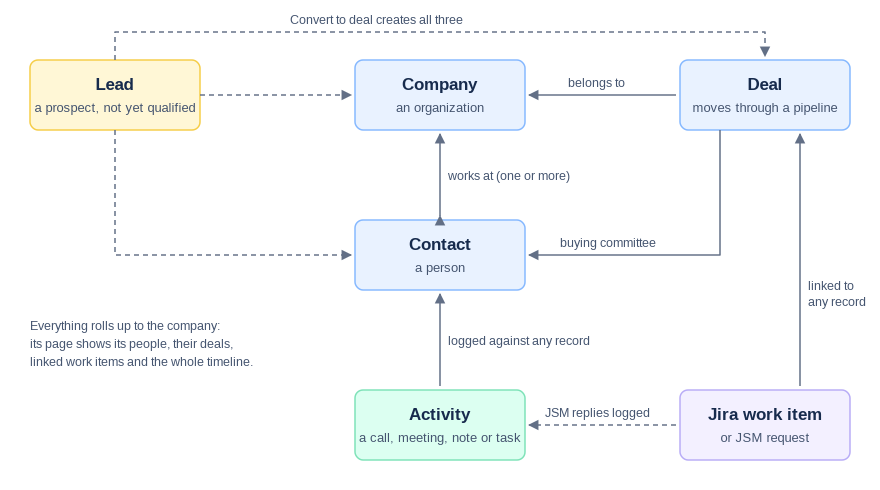 Converting a qualified lead creates its company, contact and deal in one step.
Every company gets a page
A company’s page shows its people, their deals, the work items linked to it and every activity logged against any of them, plus the follow-ups that are due. New contacts link to their company by email domain.
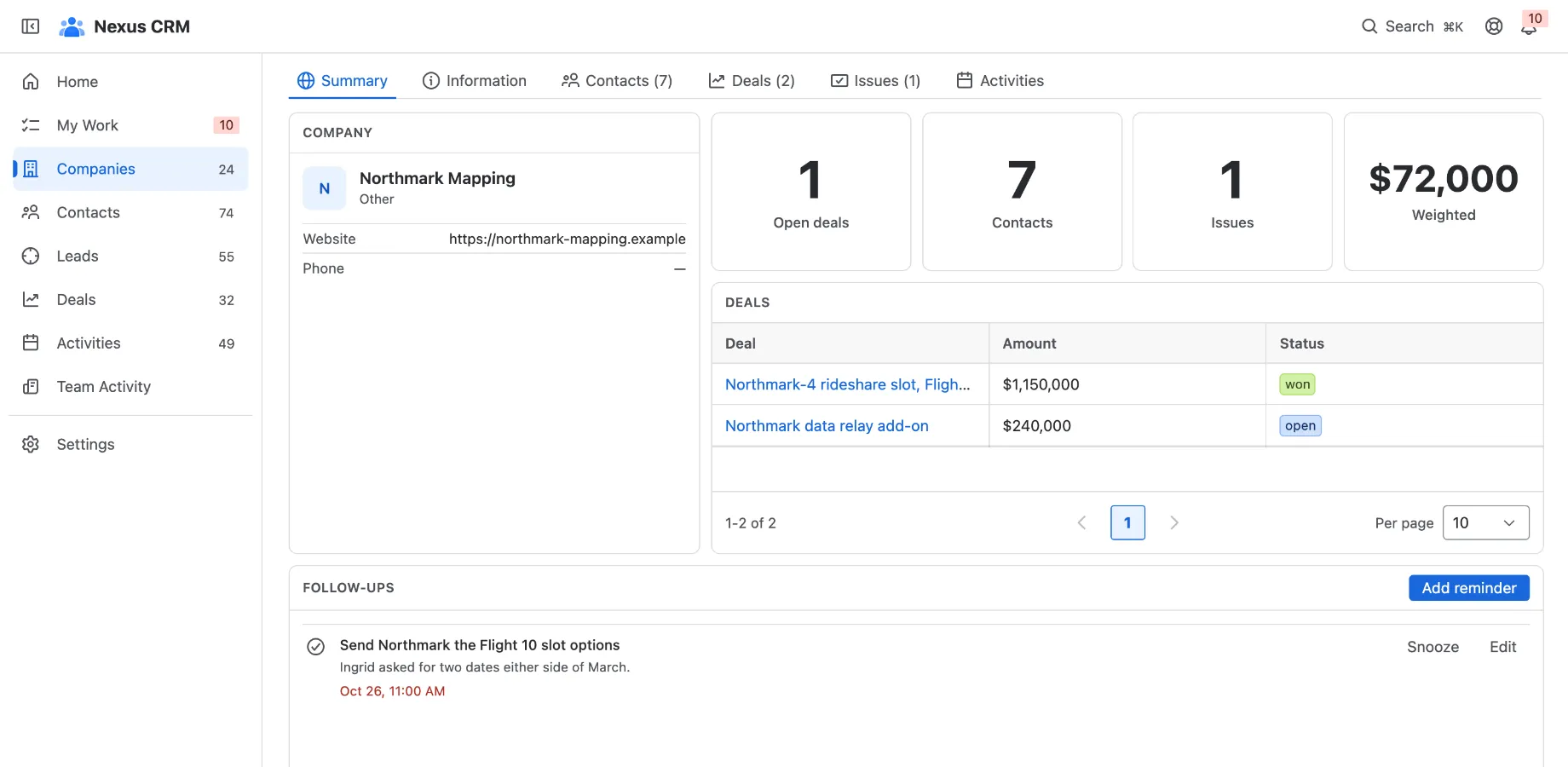 A company page: open deals, contacts, linked work and weighted value at a glance.
The pipeline adds up
Deals move across a board, one column per stage. Each stage has a default probability, so every column, and the whole board, shows both the total and the weighted value: a $240,000 deal at 30% counts as $72,000. Closing a deal as lost asks why, such as price, timing or a competitor.
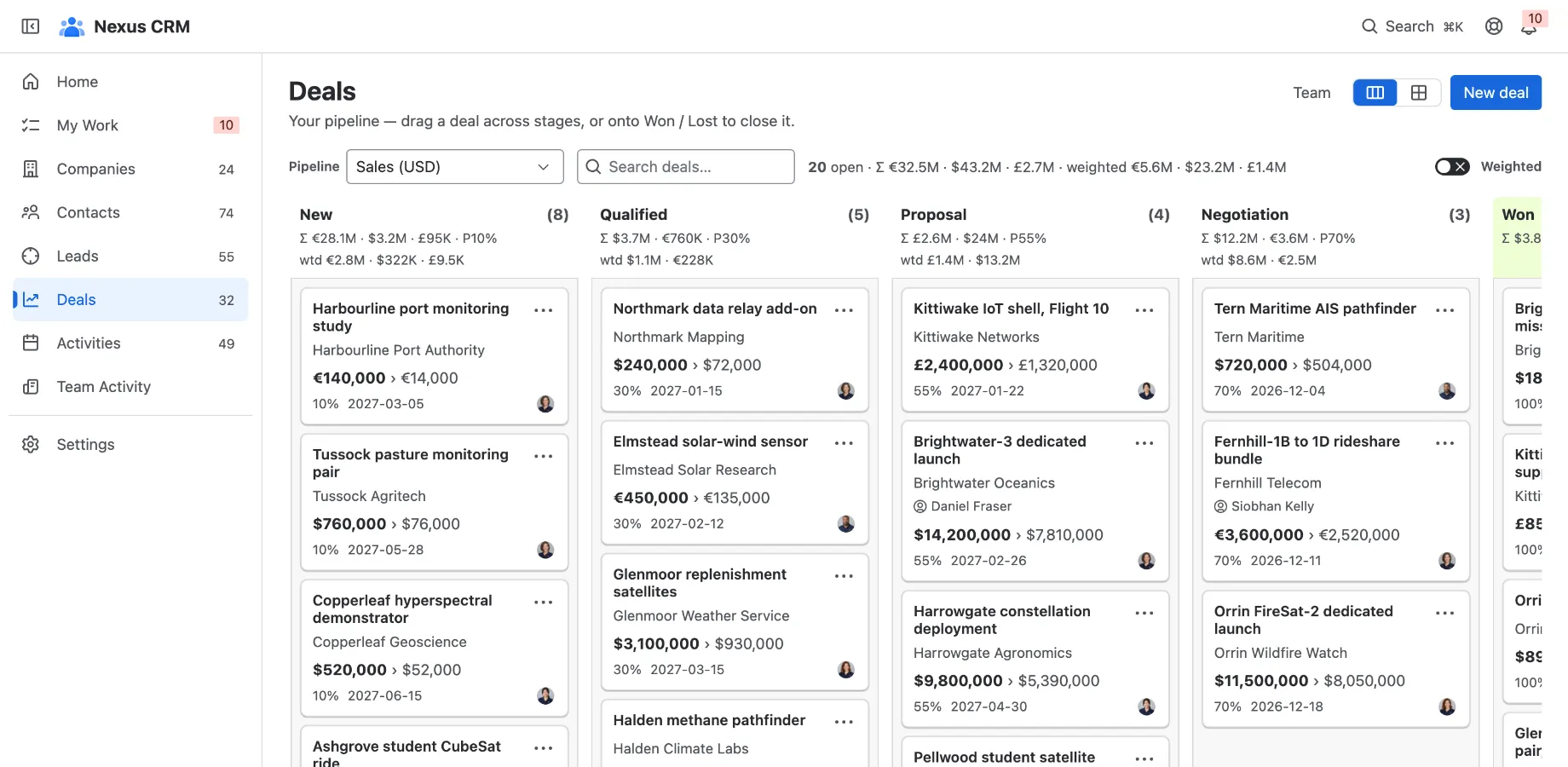 The deal board. Switch on Weighted and it doubles as a forecast.
Work and customers stay linked
Once an admin turns Nexus CRM on for a space, a panel on each work item shows the companies, contacts and deals it’s linked to.
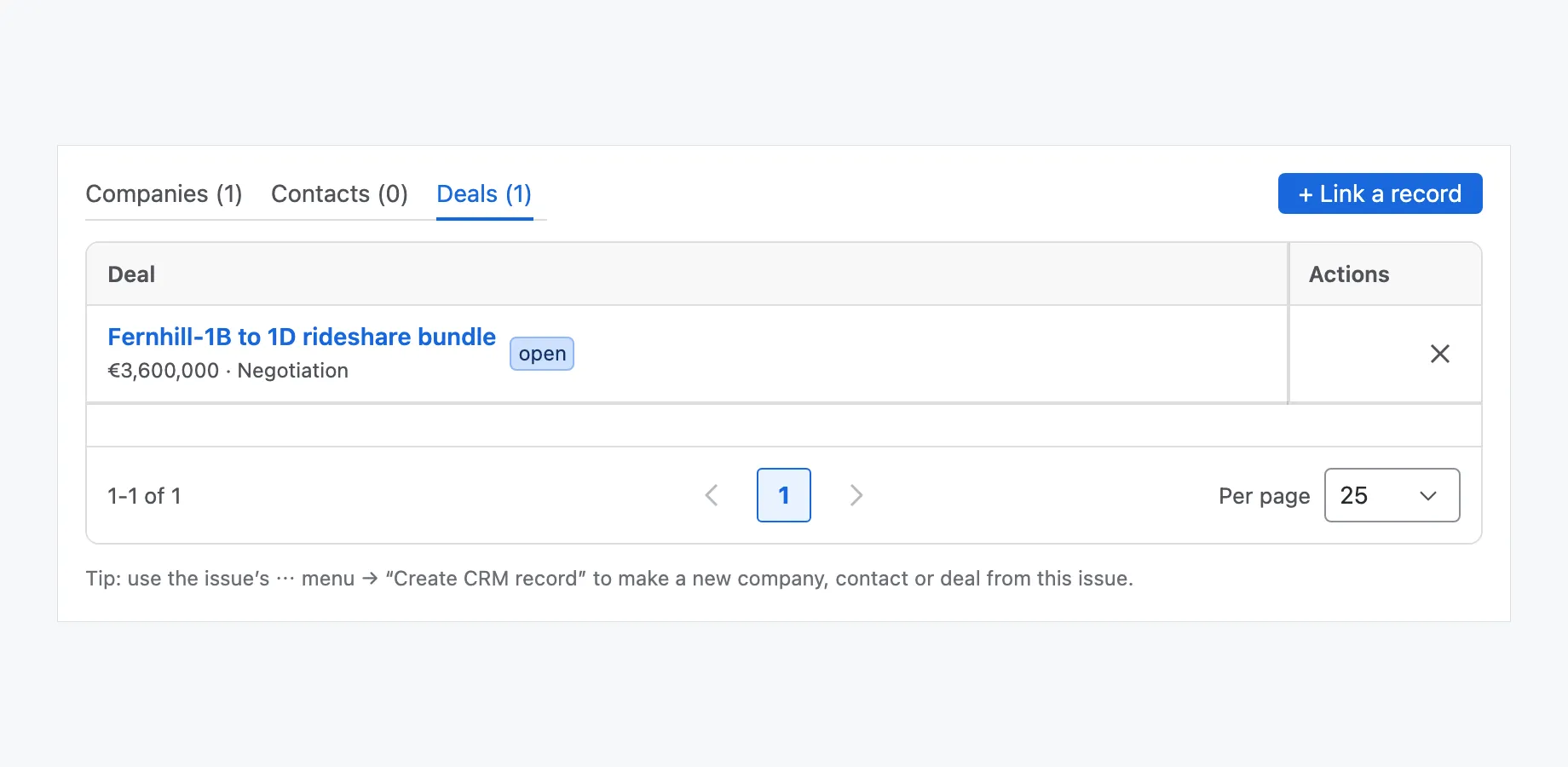 The CRM panel on a work item. Link a record searches companies, contacts and deals at once.
In the other direction, three JQL functions find work by customer, and they work in search, filters, boards, dashboards and queues:
issue in crmCompany("Fernhill")
issue in crmContact("Siobhan Kelly")
issue in crmDeal("Brightwater-3")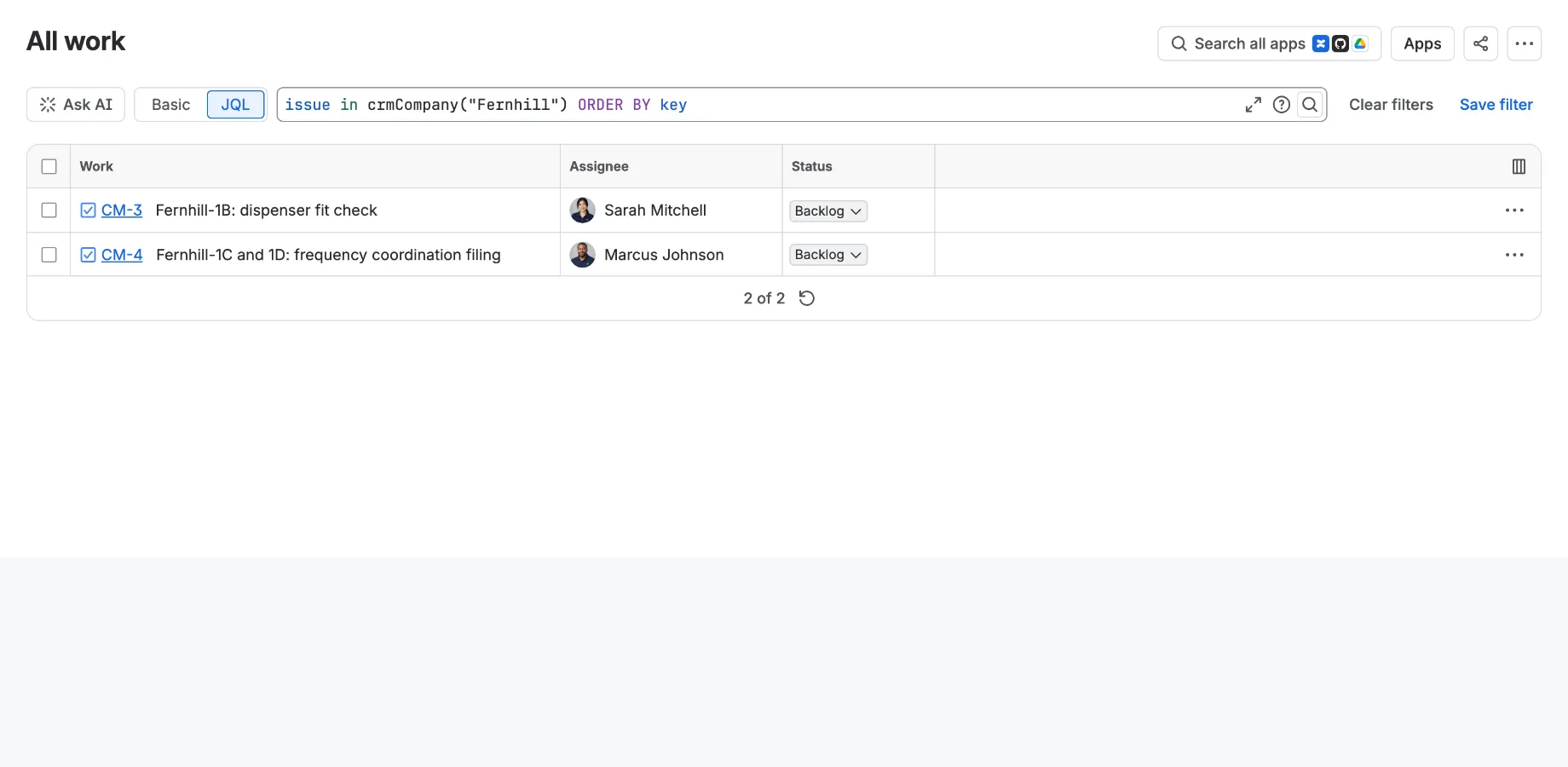 Every work item linked to Fernhill Telecom, found with one function.
Support and sales see the same customer
Turn Nexus CRM on for a service space, and every request shows the reporter’s contact, their company, up to three open deals and how much activity they have. Each new request and every public reply is logged on the customer’s timeline, and internal comments never are. To bring your service desk’s customers in, JSM Sync turns customers into contacts and organizations into companies, once or on a schedule.
Your data stays in your site
Records are stored in Forge SQL inside your Atlassian site, and the app makes no calls to outside servers. It carries the Marketplace’s Runs on Atlassian badge.
See a week of sales work in it below, or try the playground: the real app on sample data, with nothing to install and no sign-in.
When a separate CRM is the better choice
A CRM inside Jira isn’t for everyone. Keep, or choose, a dedicated CRM if:
- Your team sells from its inbox. Nexus CRM logs an email as an activity, but it doesn’t send email or connect to an inbox.
- You run marketing from your CRM, with campaigns, email sequences and lead scoring.
- Sales and delivery rarely touch the same work. A CRM in Jira pays off through the links between customers and work. Without them, you’ve only moved the address book.
- Other systems depend on your CRM, such as billing or quoting tools.
If most of your customer work already lives in Jira, start with the free Sales pipeline template, and move to a CRM app when the gaps above start to hurt. Nexus CRM’s getting started guide walks a new team through setup in six steps.
Questions
Can Jira replace a CRM?
For a small team tracking a few dozen deals, a space built from Jira’s Sales pipeline template can. Once you need company and contact records, an activity history or a forecast, add a CRM app inside Jira or connect a separate CRM.
Does Jira have a free CRM template?
Jira’s business templates include Sales pipeline and Lead tracking, and Atlassian lists both as free. They give you a board, a list, forms, a workflow and a summary, but no company or contact records.
Can a Jira dashboard show the total value of my pipeline?
Not with Jira’s built-in gadgets, which count work items but don’t total a number field such as deal value. An automation rule, a spreadsheet export or an app can give you the total.
Does Nexus CRM send email?
No. You can log an email as an activity, but Nexus CRM doesn’t send email or connect to an inbox. If your team sells from its inbox, look for a CRM that does.

Try Nexus CRM for Jira
Keep your companies, contacts, leads and deals in Jira, beside the work they drive. Work the pipeline on a board, log every call and meeting, and see the customer on every work item and service request.